

- Fine-tuned Models: Integrating your fine-tuned versions of popular models (e.g.,
ft:gpt-4.1-nano). - Internal/Proprietary Models: Using your own in-house models through the Portkey gateway.
- Models Not Natively Supported: Adding models from providers that Portkey doesn’t yet have a direct integration with, while mapping them to a compatible API signature.
Adding a New Custom Model
You can add a custom model directly from your Portkey dashboard.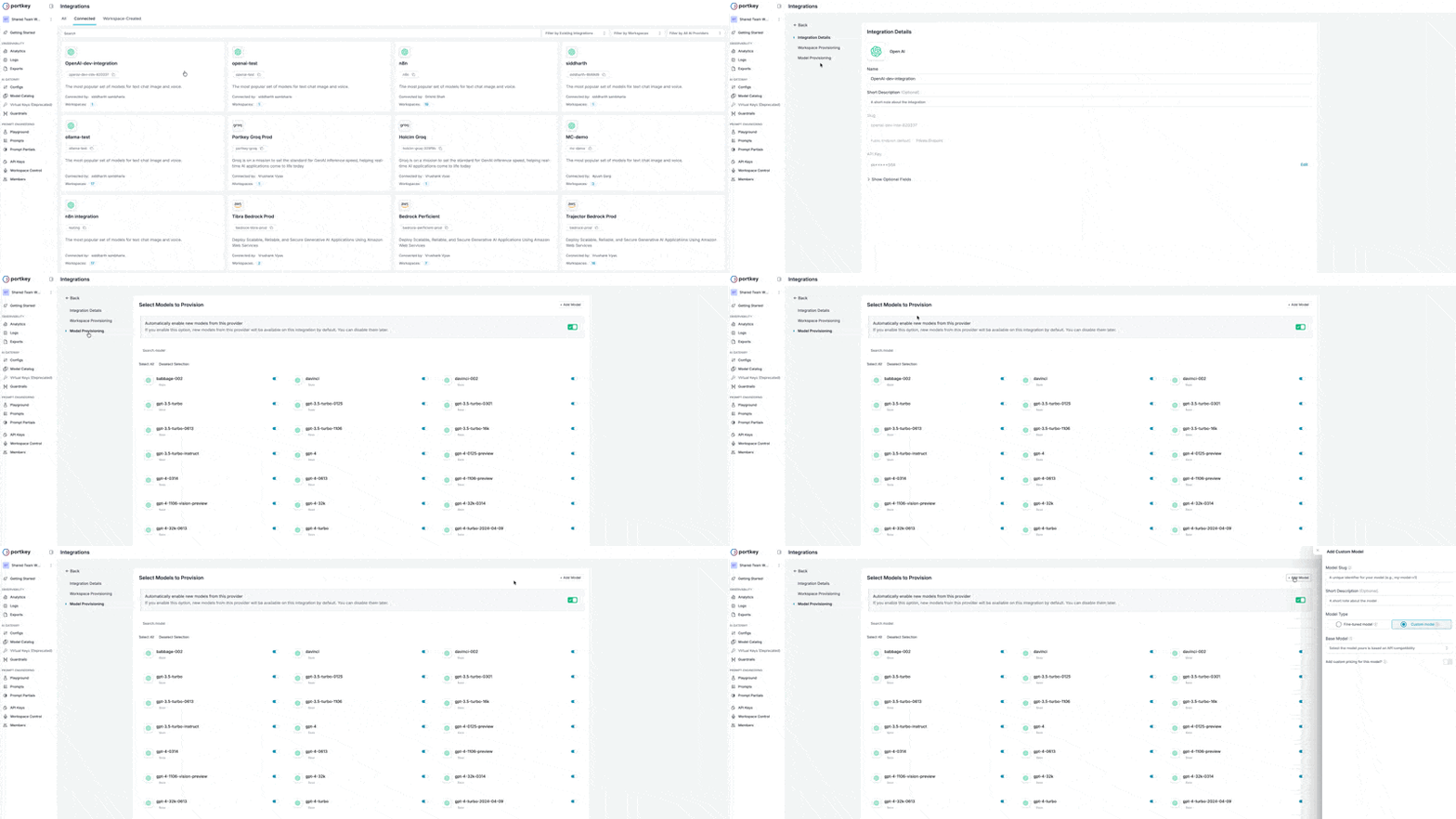
- Navigate to the relevant Integration in your Portkey account, select the Integration for which you want to add a custom model.
- Select the Model Provisioning step from steps.
- Click the Add Model button on the top-right corner of the page.
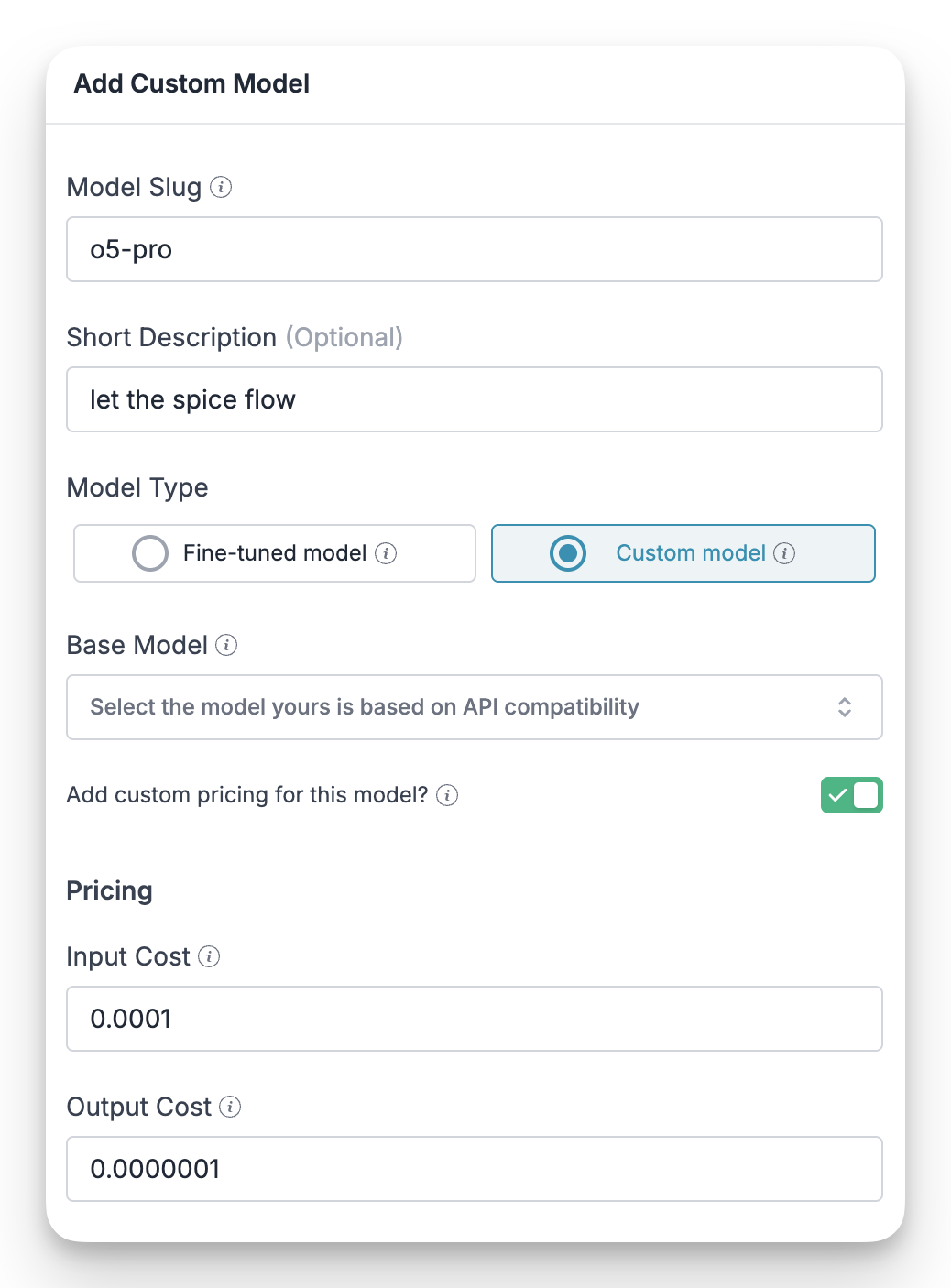
- In the Add Custom Model form, enter the Model Slug and an optional Short Description.
- Choose a Model Type: Fine-tuned Model or Custom Model. If you pick Fine-tuned Model, select the Base Model it is based on.
- Optionally, turn on Add custom pricing for this model and enter the input cost, output cost, and cache pricing.
- Optionally, turn on Pricing Adjustments to apply a discount or markup multiplier to this model.
- Optionally, set a Custom Host and any Custom Headers for this model.
- Click Apply to save the model.
Configuration Fields
Here’s a breakdown of each field in the form:Model Slug
A unique, lowercase identifier for your model (e.g.,
my-custom-model-v1). This slug is what you will use in your API requests to reference this model.Short Description
An optional, brief description to help you and your team understand the model’s purpose or version.
Model Type
Specify the nature of your model:
- Fine-tuned Model (based on an existing model): Select this if you are adding a fine-tuned version of a base model (like
ft:gpt-3.5-turbo). Selecting this option shows the Base Model field. - Custom Model (self hosted or proprietary): Select this for any other model, such as proprietary in-house models.
Base Model (Fine-tuned Model only)
Select an existing model that your fine-tuned model is based on in terms of API compatibility. For example, if your model accepts the same request payload and returns the same response structure as
gpt-4, you would select gpt-4 here. This ensures Portkey can correctly format requests and parse responses.Add custom pricing for this model
Enable this toggle if you want to associate specific costs with your model. This is useful for accurate cost tracking and budget management within Portkey’s dashboard. Once enabled, you can set:
- Input Cost: Price in USD for 1 million input (request) tokens.
- Output Cost: Price in USD for 1 million output (response) tokens.
- Cache Pricing: Optional JSON for cache token prices, for example
{"cache_write_input_token": {"price": 3.75}, "cache_read_input_token": {"price": 0.3}}.
Pricing Adjustments
Enable this toggle to apply a discount or markup multiplier to this model’s base price. Pick Default mode for the common token types (default, request, response, cache read, cache write), or Custom mode to provide the full multiplier as JSON. A multiplier of
1 leaves pricing unchanged, 0.8 is a 20% discount, and 1.2 is a 20% markup. See Per-Model Pricing Adjustments for details and version requirements.Custom Host (Optional)
The upstream base URL for this model, for example
https://your-custom-endpoint.com. See Per-model custom host and headers.Custom Headers
Header name and value pairs that Portkey sends with requests for this model. Click Add Header to add more rows.
A model with custom pricing is billed at exactly that price. Pricing adjustments set at the model level or the Integration level are ignored for it. Build any discount or markup into the custom price itself.
Per-model custom host and headers
Each integration model can carry its own routing config — useful when several custom models share one integration but hit different upstreams or need different headers.
Precedence
- Model-level
custom_headersoverride integration-levelcustom_headersfor that model. - A request-time / header-level
custom_hoststill takes priority over the model-level value.
models[].configurations), or set the Custom Host and Custom Headers fields when adding or editing the model in Model Provisioning.
custom_headers must be a flat string-to-string object. See Custom hosts for URL validation rules on custom_host.Using Your Custom Model
Once you’ve added your custom model, you can use it just like any other model in the catalog. Simply reference its Model Slug in your API calls. For example, to use a custom model with the slugmy-custom-model-v1 in a chat completion request, you would set it as the model in your provider configuration or pass it directly in the request header:
- cURL
- Python
Portkey is now PRISMA AIRS AI Gateway. See it in action.
Contact Us