> ## Documentation Index
> Fetch the complete documentation index at: https://docs.portkey.ai/docs/llms.txt
> Use this file to discover all available pages before exploring further.
# January
Introducing the MCP Gateway! 🚀✨
January marks the official release of our highly anticipated MCP Gateway – now generally available for everyone!
Alongside MCP, we’ve shipped significant upgrades across the gateway, guardrails, and provider ecosystem, empowering teams with even more robust, enterprise-ready infrastructure. With these updates, running AI in production is now smoother, more predictable, and easier to govern than ever.
See what’s new:
## Summary
| Area | Key Highlights |
| :--------------------- | :---------------------------------------------------------------------------------------------------------------------------------------------------------- |
| **Platform** | • MCP Gateway GA • Claude Code with any provider • Inline Image URLs Plugin • Usage and Rate Limit Policy Enhancements |
| **Gateway** | • Responses API hooks • Unified Rerank API • Dynamic model pricing (air gapped) |
| **Guardrails** | • Azure Shield Prompt and Protected Material • Sequential execution • CrowdStrike AIDR |
| **Models & Providers** | • All providers via /messages • xAI Realtime Voice • Google Maps grounding • /messages endpoint with Bedrock |
| **Community & Events** | • Agent Harnesses Salon: BLR (Sat 28 Feb) |
## Introducing the MCP Gateway!
Portkey’s **MCP Gateway** is now generally available, so you can set up a unified access layer for MCP tools without extra glue code.
* **Built-in support for every auth type** — Use OAuth 2.1, API keys, or bring your own auth with Okta, Entra, and more.
* **Central MCP registry** — Add and manage internal and external MCP servers in one place.
* **RBAC** — Decide exactly which teams and members can use specific MCP servers and tools.
* **Full observability** — See every MCP tool call with full context, logs, and traces.
[Read more about MCP Gateway](/product/mcp-gateway)
## How Fontys ICT built an internal AI platform
Fontys ICT, a university of applied sciences in the Netherlands, ran a six-month pilot with \~300 users to build a governed, multi-provider AI platform.
They used Portkey's gateway architecture so they could control access, keep usage within EU infrastructure, enforce budgets, and give students and staff equitable access to AI without losing oversight. [Read the whitepaper](https://arxiv.org/html/2512.08978v1)
## Platform
### Use Claude Code with any provider
Claude Code now works across providers via the /messages endpoint. Choose the provider that fits your needs, cost, latency, or availability, while keeping the same Claude Code workflow. No rewrites, no provider-specific logic.
What you get:
* No provider lock-in as your usage scales
* Easier experimentation and cost control
[Set up Claude Code](https://portkey.ai/docs/integrations/libraries/claude-code#claude-code)
### The best way to use AI apps and tools!
### Inline Image URLs Plugin
The Image URLs plugin now automatically converts external image URLs into inline base64 data, so your images stay accessible in VPC-SC environments where external links aren’t allowed.
### Usage and Rate Limit Policy Enhancements
You can now get more precise with budget and rate limit policies by defining them using:
* `virtual_key`: Match by virtual key slug
* `provider`: Match by provider (e.g., openai, anthropic)
* `config`: Match by gateway config slug
* `prompt`: Match by prompt template slug
* `model`: Match by model with wildcard support (e.g., @openai/gpt-4o, @anthropic/\*)
[Configure budget policies](/product/enterprise-offering/budget-policies)
## Gateway
### Enhanced support for Responses API
You can now add input/output guardrails, custom webhooks, and other hooks to Responses API requests, so policy enforcement stays consistent across your inference traffic.
### Unified Rerank API
We’ve added a unified `/rerank` endpoint so you can swap between supported reranking providers (Cohere, Jina, Voyage AI) without changing your application code.
## Guardrails
### Azure Shield Prompt
Azure Shield Prompt helps you spot jailbreak and prompt injection attempts in requests by scanning both system prompts and user messages. You can authenticate with either an API key or Entra ID.
[Add this guardrail](/integrations/guardrails/azure-guardrails#azure-shield-prompt)
### Azure Protected Material
Azure Protected Material scans LLM outputs for known copyrighted or protected text, helping you stay compliant with intellectual property requirements.
[Add this guardrail](/integrations/guardrails/azure-guardrails#azure-protected-material)
### Sequential Guardrails Execution
With the new `sequential` flag, you can run guardrail checks one after another instead of all at once. It’s handy when later checks depend on earlier results or when execution order matters. [Set up sequential guardrails](/product/guardrails)
### CrowdStrike AIDR
We’ve teamed up with CrowdStrike so you can connect Portkey directly with CrowdStrike AI Detection and Response. Scan LLM inputs and outputs for threats or sensitive content, keep data safe, automate compliance, and move faster with enterprise-grade security.
[Connect CrowdStrike AIDR](/product/guardrails)
## Models and providers
### Highlights
Unified /messages support: Portkey now supports all providers via the `/messages` endpoint
Realtime Voice Agent API: Added compatibility with OpenAI’s Realtime API over WebSocket, plus pricing for the grok-2-voice model so you can build conversational voice experiences without switching SDKs. Try xAI Voice.
Google Maps grounding: You can now add map and location context to Gemini and Vertex AI responses to ground answers in real-world places. See Gemini docs or See Vertex docs.
`/messages` endpoint with Bedrock: Bedrock models now use the native /v1/messages endpoint, unlocking features like citations and better parity with Anthropic’s direct API.
### Model & provider enhancements
OpenAI & Azure OpenAI: You can now use gpt-image-1 parameters like moderation, output\_format, output\_compression, background, partial\_images, and stream. Batch creation also supports output\_expires\_after.
Anthropic: Responses now include full citation support, making it easy to trace model outputs back to their sources.
## Resources
* **Blog:** [Introducing the MCP Gateway](https://portkey.ai/blog/introducing-the-mcp-gateway/)
* **Blog:** [We Tracked \$93M in LLM Spends Last Year. Now the Data is Yours.](https://portkey.ai/blog/we-tracked-93m-in-llm-spends-last-year-now-the-data-is-yours/)
* **Blog:** [How Fontys ICT built an institutional AI platform with a gateway architecture](https://portkey.ai/blog/how-fontys-ict-built-an-institutional-ai-platform-with-a-gateway-architecture/)
* **Blog:** [LLM hallucinations in production](https://portkey.ai/blog/llm-hallucinations-in-production/)
## Community Contributors
A special thanks to our contributors this month: [beast-nev](https://github.com/beast-nev) and [aasishraj](https://github.com/aasishraj)!
## Support
Open an issue on GitHub
Get support in our Discord
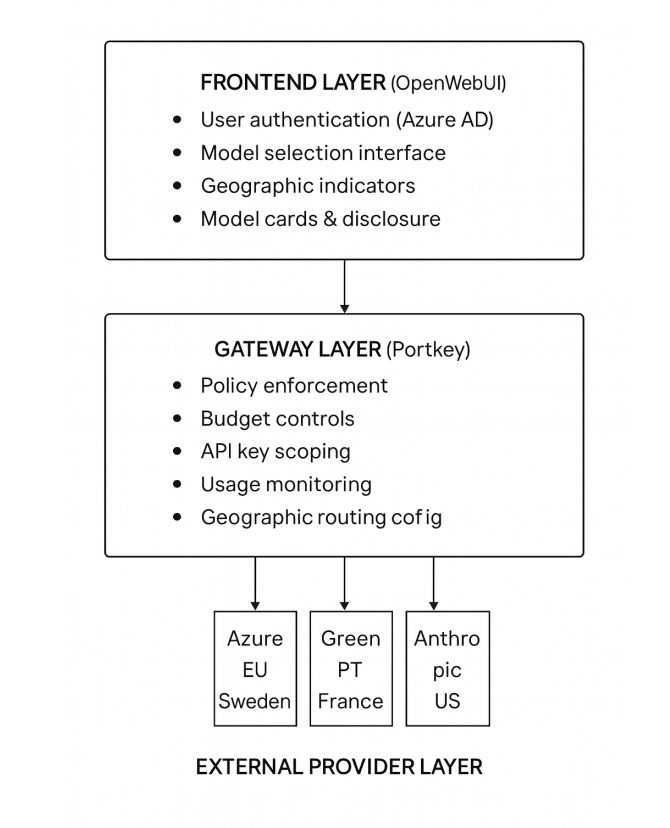 They used Portkey's gateway architecture so they could control access, keep usage within EU infrastructure, enforce budgets, and give students and staff equitable access to AI without losing oversight. [Read the whitepaper](https://arxiv.org/html/2512.08978v1)
## Platform
### Use Claude Code with any provider
Claude Code now works across providers via the /messages endpoint. Choose the provider that fits your needs, cost, latency, or availability, while keeping the same Claude Code workflow. No rewrites, no provider-specific logic.
What you get:
* No provider lock-in as your usage scales
* Easier experimentation and cost control
[Set up Claude Code](https://portkey.ai/docs/integrations/libraries/claude-code#claude-code)
### The best way to use AI apps and tools!
They used Portkey's gateway architecture so they could control access, keep usage within EU infrastructure, enforce budgets, and give students and staff equitable access to AI without losing oversight. [Read the whitepaper](https://arxiv.org/html/2512.08978v1)
## Platform
### Use Claude Code with any provider
Claude Code now works across providers via the /messages endpoint. Choose the provider that fits your needs, cost, latency, or availability, while keeping the same Claude Code workflow. No rewrites, no provider-specific logic.
What you get:
* No provider lock-in as your usage scales
* Easier experimentation and cost control
[Set up Claude Code](https://portkey.ai/docs/integrations/libraries/claude-code#claude-code)
### The best way to use AI apps and tools!
_01KGPZJMZAPZ631H0ECG98PY4E.png) ### Inline Image URLs Plugin
The Image URLs plugin now automatically converts external image URLs into inline base64 data, so your images stay accessible in VPC-SC environments where external links aren’t allowed.
### Usage and Rate Limit Policy Enhancements
You can now get more precise with budget and rate limit policies by defining them using:
* `virtual_key`: Match by virtual key slug
* `provider`: Match by provider (e.g., openai, anthropic)
* `config`: Match by gateway config slug
* `prompt`: Match by prompt template slug
* `model`: Match by model with wildcard support (e.g., @openai/gpt-4o, @anthropic/\*)
[Configure budget policies](/product/enterprise-offering/budget-policies)
## Gateway
### Enhanced support for Responses API
You can now add input/output guardrails, custom webhooks, and other hooks to Responses API requests, so policy enforcement stays consistent across your inference traffic.
### Unified Rerank API
We’ve added a unified `/rerank` endpoint so you can swap between supported reranking providers (Cohere, Jina, Voyage AI) without changing your application code.
## Guardrails
### Azure Shield Prompt
Azure Shield Prompt helps you spot jailbreak and prompt injection attempts in requests by scanning both system prompts and user messages. You can authenticate with either an API key or Entra ID.
[Add this guardrail](/integrations/guardrails/azure-guardrails#azure-shield-prompt)
### Azure Protected Material
### Inline Image URLs Plugin
The Image URLs plugin now automatically converts external image URLs into inline base64 data, so your images stay accessible in VPC-SC environments where external links aren’t allowed.
### Usage and Rate Limit Policy Enhancements
You can now get more precise with budget and rate limit policies by defining them using:
* `virtual_key`: Match by virtual key slug
* `provider`: Match by provider (e.g., openai, anthropic)
* `config`: Match by gateway config slug
* `prompt`: Match by prompt template slug
* `model`: Match by model with wildcard support (e.g., @openai/gpt-4o, @anthropic/\*)
[Configure budget policies](/product/enterprise-offering/budget-policies)
## Gateway
### Enhanced support for Responses API
You can now add input/output guardrails, custom webhooks, and other hooks to Responses API requests, so policy enforcement stays consistent across your inference traffic.
### Unified Rerank API
We’ve added a unified `/rerank` endpoint so you can swap between supported reranking providers (Cohere, Jina, Voyage AI) without changing your application code.
## Guardrails
### Azure Shield Prompt
Azure Shield Prompt helps you spot jailbreak and prompt injection attempts in requests by scanning both system prompts and user messages. You can authenticate with either an API key or Entra ID.
[Add this guardrail](/integrations/guardrails/azure-guardrails#azure-shield-prompt)
### Azure Protected Material
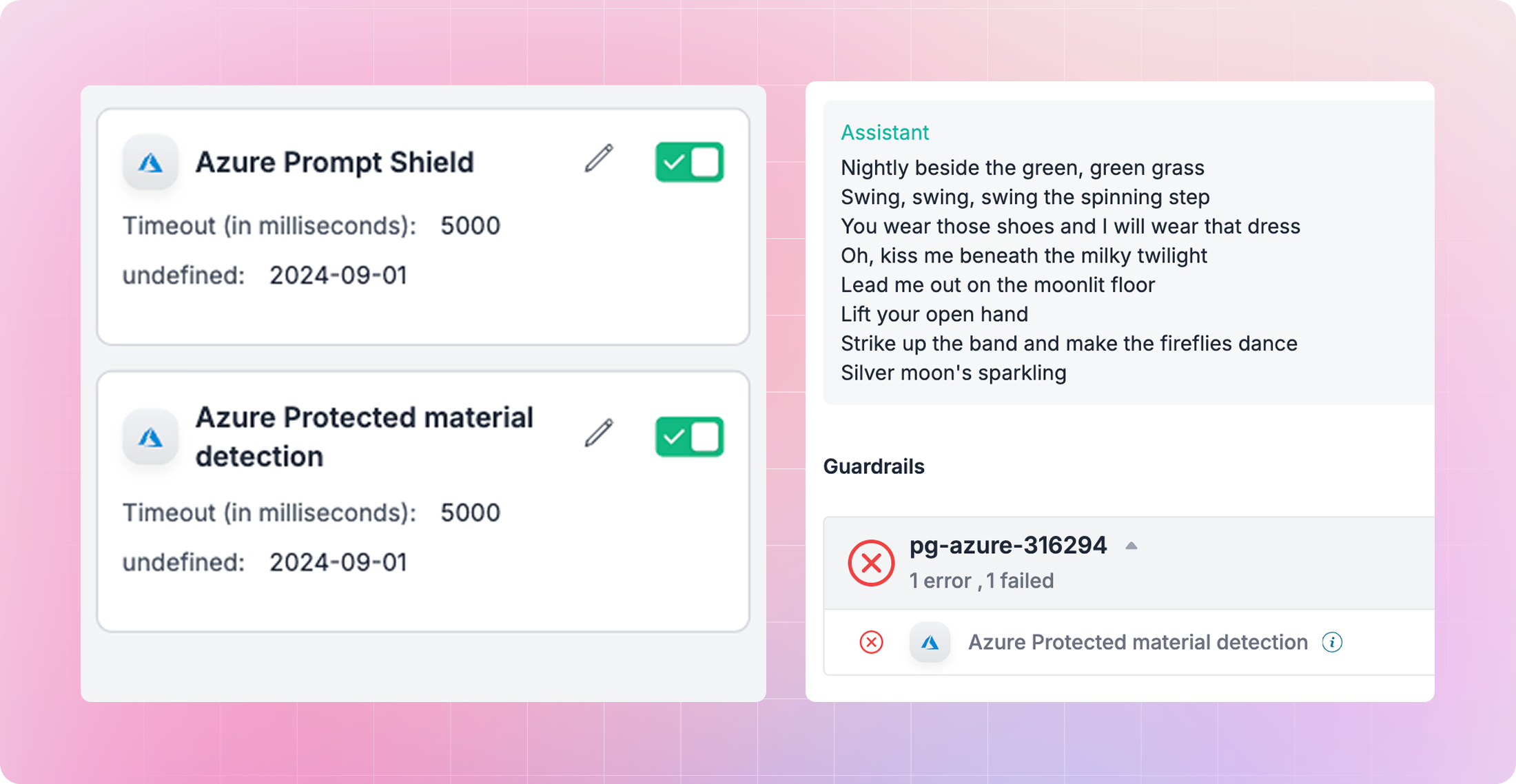 Azure Protected Material scans LLM outputs for known copyrighted or protected text, helping you stay compliant with intellectual property requirements.
[Add this guardrail](/integrations/guardrails/azure-guardrails#azure-protected-material)
### Sequential Guardrails Execution
Azure Protected Material scans LLM outputs for known copyrighted or protected text, helping you stay compliant with intellectual property requirements.
[Add this guardrail](/integrations/guardrails/azure-guardrails#azure-protected-material)
### Sequential Guardrails Execution
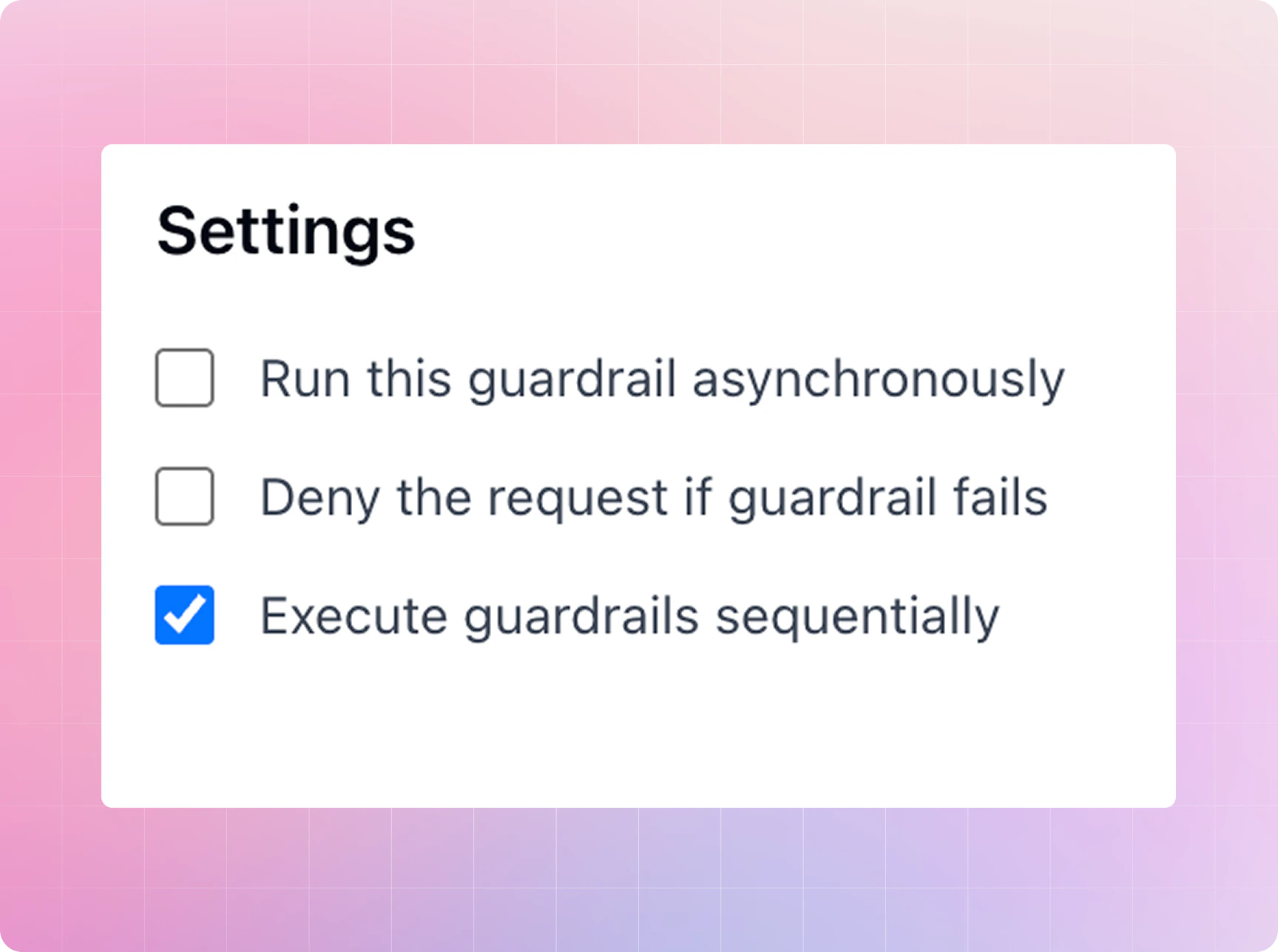 With the new `sequential` flag, you can run guardrail checks one after another instead of all at once. It’s handy when later checks depend on earlier results or when execution order matters. [Set up sequential guardrails](/product/guardrails)
### CrowdStrike AIDR
We’ve teamed up with CrowdStrike so you can connect Portkey directly with CrowdStrike AI Detection and Response. Scan LLM inputs and outputs for threats or sensitive content, keep data safe, automate compliance, and move faster with enterprise-grade security.
[Connect CrowdStrike AIDR](/product/guardrails)
## Models and providers
### Highlights
With the new `sequential` flag, you can run guardrail checks one after another instead of all at once. It’s handy when later checks depend on earlier results or when execution order matters. [Set up sequential guardrails](/product/guardrails)
### CrowdStrike AIDR
We’ve teamed up with CrowdStrike so you can connect Portkey directly with CrowdStrike AI Detection and Response. Scan LLM inputs and outputs for threats or sensitive content, keep data safe, automate compliance, and move faster with enterprise-grade security.
[Connect CrowdStrike AIDR](/product/guardrails)
## Models and providers
### Highlights